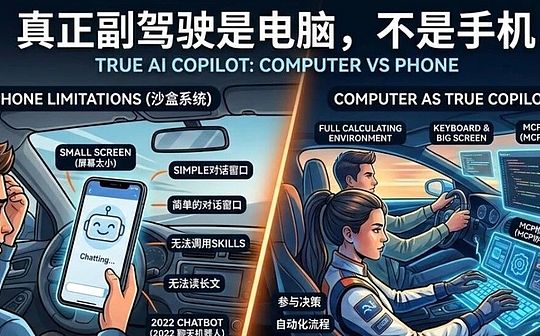
System Closure: The data silos between apps prevent AI from truly accessing your files and workflows. But the deeper reason lies in the fact that the mobile phone is inherently a consumer platform. From its physical design to system interaction, the mobile phone was originally intended to allow you to receive content defined by others; it is the main battleground for social media, short videos, and games. Within the mobile phone ecosystem, users are naturally locked into the role of "consumers," making it extremely difficult for them to become deep "producers." Even with AI, this situation remains unchanged. Even if you install the most advanced AI models on this screen, it will often ultimately become another form of "content consumption"—you're simply consuming pretty pictures, fragmented answers, or humorous captions generated by AI, rather than using them to build systems or generate complex value. This is because in mobile AI apps, you're limited to a simple dialogue window. You can hardly access other external tools, configure or call up advanced Skills, etc. Engaging in in-depth discussions with AI on a mobile phone is extremely difficult; you might even struggle to read its complete responses. A rigorous, high-quality AI solution often consists of thousands of words, interspersed with complex code blocks, mathematical formulas, and structured multi-dimensional charts. What can you possibly see on a small smartphone screen? To cater to this screen, AI is forced to "degrade its intelligence," cutting out profound logic and ultimately becoming a cybernetic chatbot that can only tell jokes and write trivial chatter. At this point, some might cite the recently viral open-source AI agent OpenClaw (commonly known as "Lobster") to refute this. You might think: I can simply lie comfortably on the sofa, send a voice command to my "Lobster" via WhatsApp or WeChat on my phone, and it can automatically scrape web data, perform competitive analysis, and even write code and run backtesting in the background. I can do complex work just by chatting on my phone, so why can't a phone be a productivity tool? But this is precisely a huge cognitive trap. The viral success of "Lobster" doesn't prove that mobile phones are a productive force; instead, it reaffirms the fact that mobile phones are merely consumer devices. Think about it: the reason "Lobster" can accomplish these impressive automated tasks is because it's deployed on a computer (or cloud server) with a complete file system, terminal permissions, and a programming environment. Your phone isn't playing the role of a productivity tool at all; it's merely a "walkie-talkie" or "remote control." The one truly doing the dirty work is still the silently running computer. Using your phone is simply remotely "consuming" the final result produced by the combination of computing power and large-scale models on the computer. Without a physical computer as a "workstation," the commands your phone sends are just a bunch of meaningless characters. Therefore, even a powerful physical-level intelligent agent like OpenClaw cannot change the fact that the phone is merely a consumer terminal and a display window. III. What does a true co-pilot need? For AI to truly become a co-pilot, it must run on a computer, because computers provide several irreplaceable core conditions: 1. An extremely efficient input environment. The keyboard remains the most efficient tool for human-machine interaction, bar none. When you need to write complex instructions, invoke special symbols (such as @ to invoke GPTs plugins, or $ to adjust Skills), construct multi-line logical structures, or perform script concatenation, the virtual keyboard on a mobile phone is disastrous. Although voice input is improving, when dealing with rigorous logic and modifying code, the keyboard is the scalpel, while voice is merely a megaphone. 2. A Complete Panoramic Output Environment. True thinking requires a "panoramic view." A mobile phone screen can only show you a linear dialogue flow, while a large computer screen can display: The left side shows the AI's reasoning process. The right side shows the generated code or long document. The bottom shows the running terminal or a reference table. The background shows real-time data viewed by the browser. Only with a large screen, a complete browser, an IDE (Integrated Development Environment), and a wealth of software available for AI to use can you truly manage massive information flows and make "multi-window comparison decisions." 3. The ability to "feed" massive amounts of data. Data is the new oil. But the question is, what can you feed AI on your phone? A few paragraphs of text? A screenshot? That's far from enough. Large models work on a token basis, and their context windows are getting larger and larger. On a computer, you can: Feed it the entire Markdown document of your project directly. Let it analyze tens of thousands of rows of Excel/CSV data. Let it read the code structure of an entire folder. If you only give the AI fragmented data, you're using an airplane engine to roast sweet potatoes. 4. Tool combinations and links. Truly revolutionary capabilities come from the combination of tools. On mobile phones, apps are silos, and data flow is difficult. But on computers, AI is the glue that connects everything. Looking back at each wave of AI hype over the past few years, from a certain perspective, it has essentially been about giving AI, which could only "talk," "hands and feet" and "glasses." The earliest breakthrough: The earliest ChatGPT was completely confined to a web chat window; it was like a brain strapped to a chair, only capable of plain text chat.
Equipped with "Eyes":By 2023, AI could connect to the internet for the first time. How excited were people when a "connect to the internet" button appeared in that chat window? Because it could finally see the outside world on its own.
Transformed into a Toolbox:Followed by the birth of GPTs, everyone exclaimed, "The new App Store has arrived!" AI began to transform into various specialized tools, combining these tools to solve your problems.
Breaking down the underlying protocol (MCP):Modern AI can now access the entire system environment. Through the MCP (Model Context Protocol), desktop AI (such as ChatGPT Codex) is no longer limited to the chat window. You can directly make it open a webpage or connect to your local database, automatically read the core information, and then directly extract and send it back to the chat window, or even write it directly into your local project.
Equipping it with "skills":Skills, which were very popular for half a year last year, further enabled AI to combine various automation scripts and reuse various local command-line tools. It can directly call upon your computer's Python environment to run a backtest, or operate the terminal to reconstruct files. AI is no longer just theoretical; it has truly grown "hands and feet" that can work within your system. Evolving into "Teams" (Agents): The collaboration of multiple agents has qualitatively changed this combined capability. You are no longer facing a single large model, but commanding an AI team. They move freely between your local file system and various tools; one is responsible for retrieving information, one for writing code, and one for testing and running, working together to complete a complex project. AI has completely become a "working team." This "native AI combination capability," based on the MCP protocol, dynamic Skills invocation, and multi-agent collaboration, relies on the computer's open file system, terminal environment, and underlying permissions. This ability to "connect" tools like Word, PPT, Email, VS Code, and Terminal can never be fully realized in the closed sandbox system of a mobile phone. In the highly restrictive ecosystem of mobile phones, all data is physically isolated. If you only use a mobile phone, you are forever forced to remain at the stage of "the earliest plain text chat window." It's 2026, and AI on mobile phones is essentially the same as the chatgpt.com chatbot of 2022. V. Agents and Programming are the Real Breakthrough Points AI's true world-changing potential lies not in "chatting," but in "building." With the rise of programmable agents (such as Claude Code, ChatGPT Codex, and Google Antigravity), AI's role has undergone a qualitative change. It no longer just gives you advice; it can directly manipulate your computer: It can help you write a Python script to automatically organize disordered files on your desktop. It can help you batch rename thousands of photos. It can help you build a simple personal website and deploy it directly online. This is the true meaning of a "co-pilot": you tell it your destination, it operates the dashboard for you, and even steps on the gas for you. This kind of automated, system-level capability relies entirely on the computer's file system and programming environment. On a mobile phone, you can never experience this kind of awe-inspiring feeling of "watching the system run automatically." In conclusion: Please carry a computer with you. AI's capabilities iterate at an astonishing speed; it is already a "generalist" proficient in multiple languages, programming, and logical reasoning. If you want to truly master this doctor and restructure your productivity system:
Then please carry a computer with you.
Because the real co-pilot isn't the profile picture chatting with you on WeChat, but the super collaborator on your computer, ready to take over the keyboard at any time and operate the entire operating system alongside you.

 Anais
Anais