Author: Damian Player; Translator: Peggy, BlockBeats
Editor's Note: While most people still view AI as a "more efficient search tool," Perplexity is starting to do the work.
This article revolves around a frequently overlooked difference—why, when using AI, some people only get a short answer while others get deliverable results directly. The key is not the model's capabilities, but how it's used: whether the tool is treated as a dialogue window or as an execution system that can be commanded and scheduled.
A new type of tool, represented by Perplexity Computer, replaces "questioning" with "tasks" as the core interaction method. From contract review and competitor analysis to data cleaning and report generation, users no longer describe the problem but directly define the final deliverable. Coupled with connecting enterprise tools and solidifying personal background and style examples, this capability further evolves from one-off outputs into reusable and automated workflows.
More importantly, the boundaries of automation are being redefined. It's no longer just about assisting in completing a single step; it can run continuously, execute across tools, and even proactively propose supplementary tasks. This means the relationship between humans and tools is shifting from "use" to "management and delegation." Under this change, the real dividing line is no longer whether to use AI, but whether to have already begun using it to "deliver results." Those who understand this will gain an asymmetric advantage. Soon, everyone will learn how. But before everything becomes obvious, here are the ways you can start in advance. Over the past year, developers have been running autonomous AI agents (such as Claude Code and OpenClaw) in the background, which can conduct research, build products, and deliver complete results independently, without requiring repeated human intervention or prompts. But you've never really needed this—unless you know how to use a terminal and write code. Perplexity Computer changes that. For the first time, non-developers can use the same capabilities. All you need is a browser and a task to delegate to it. Most people open Perplexity, type in a question, get the answer, and close the page. They're missing the point. Perplexity Computer isn't for answering questions; it's for performing tasks. Stop asking questions and start giving it real work.

Why Most People Fail
CFOs, lawyers, consultants… they open the tool, type in a question, get a decent answer, and think, "Oh, a more advanced Google." Then they spend another 90 minutes cleaning up the spreadsheet they just cleaned up last Monday.
The problem isn't the tool, it's how it's used. They're treating it like a chatbot.
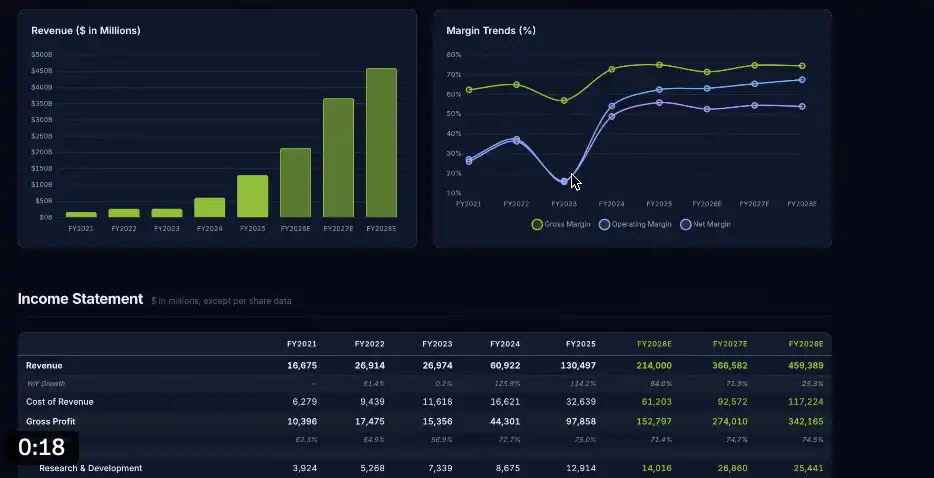
Questioning Method: "What are the risks of this contract?" Task Method: "Review this contract. Check each clause for supporting information from publicly available sources; highlight vague wording, missing clauses, and sections that may lead to legal liability; list the 5 most critical risk points and provide specific clause references; output a Word document with revision marks." The same contract. One approach only provides a checklist for you to read yourself; another approach directly provides a finished product ready to send to the client. Set up this system in just 10 minutes. First, connect the tools. Click on connectors in the sidebar. Perplexity can connect to over 400 applications: Gmail, Google Drive, Slack, Salesforce, Notion, SharePoint… connect to all the ones you actually use. Then let it know who you are. Type it once: "I am a certain position, working for a certain type of company. I regularly produce content like X, Y, and Z. Please remember this context in each session." It will retain this information long-term. Next, tell it "what's good." Find 2-3 of your best outputs, upload them, and type: "These are my best work examples. Please study their format and tone, and use them as a reference when generating content in the future." This way, it's not guessing your style, but rather deconstructing your proven successful paths. Spend 10 minutes doing this first. A Real-Life Example: The Monday That No Longer Wastes 90 Minutes A financial analyst received a data export every Monday—150 lines, formatted haphazardly: duplicate data, three different date formats, and ratings written in text instead of numbers. Before starting her analysis, she spent 90 minutes each week cleaning the data. The same problem, repeated week after week. She entered only one instruction: Clean the file, remove duplicates, standardize date formats, convert text ratings to numbers; perform analysis on the cleaned data; generate an interactive dashboard with filters and provide a shareable link; output a PDF report comparing the before and after cleaning; save all files to the "Monday Reports" folder in Drive. Four minutes later: a clean dataset, an interactive dashboard, a shareable link, and a PDF report—all appeared in her Drive. Then she asked, "Are there any improvements I haven't asked about that could make this even more useful?" The system suggested two things: first, set the task to run automatically every Monday morning at 7 AM; second, add a new task to generate Tuesday management briefings based on underperforming sections. She set both up and closed the page. After that, it ran automatically every Monday—regardless of whether her computer was on or off. This is exactly the capability developers have been using for the past year. Now, you can use it in your browser. What are people already doing with it? @gregisenberg did a live test on the @startupideaspod podcast. He gave them only one task: identify the companies advertising on competitor podcasts, pinpoint the actual sponsors, and write a personalized email for each. The system found Ramp's VP of Growth, retrieved content from a podcast he'd participated in two weeks prior, wrote a cold email quoting his specific comments from the show, and sent it directly. Greg didn't say "send," but the system deemed the task complete and executed it automatically. It then proactively suggested: monitor competitor podcasts, and immediately alert them and include the corresponding contact person as soon as a new brand starts advertising—"contact them as soon as the budget starts." Ultimately, this process completed research on 96 potential clients in parallel and scheduled follow-up emails on days 3 and 7. In the Marketing Against the Grain program, the team used it to audit the entire HubSpot product page: automatically crawling the entire site, scoring by custom criteria, sorting issues, and generating a shareable website report. What would normally be a week's work was completed during the recording of the program. This was all done live, not as a demo or a pre-scripted exercise. Usage for specific tasks: In the financial sector, a portfolio analyst issued only one task before Nvidia's earnings release. The result was: a real-time interactive dashboard containing $130.5 billion in revenue, a 75% gross margin, a 114.2% growth rate, a complete profit and loss statement, and projected profit margin trends from fiscal year 2021 to 2028, all with filterable and shareable links. No Excel required, no manual data retrieval, completed in 5 minutes. Perplexity can directly access data sources such as SEC disclosures, FactSet, S&P Global, and PitchBook—no API key or additional authorization required; the system handles it all internally.
Legal Scenario:
“Review this contract. Verify that all statements are supported by publicly available sources; highlight vague wording, missing standard clauses, and content that may incur legal liability under [specific state] contract law; list the 5 most critical risk points and attach specific clause references; output a Word document with revision marks.”
A reviewer once uploaded a proposal claiming that a certain market had grown by 43% year-on-year.
Perplexity Computer discovered that only 4% of the data was accurate, preventing problems before signing the contract. Marketing Scenario: "Analyze the best-performing content from [Competitor 1], [Competitor 2], and [Competitor 3] over the past 30 days; identify the most engaging content formats and themes; identify content gaps; generate a 30-day content calendar based on these gaps and save it as a Google Doc." Set it as a scheduled task. It automatically generates the latest competitor analysis every Monday, eliminating the need for manual research. Operations Scenario: "This is our Q1 CSV data. Please clean the data; analyze revenue by region and product line; identify the three biggest problems; generate a one-page action plan; create a one-page presentation PPT; save all files to the project folder." Five deliverables, one instruction. It's already done while you're in a meeting. Model Council: Three Judgments in 60 Seconds When faced with a decision with real consequences, you only need to enter the question once. Perplexity will simultaneously invoke Claude, ChatGPT, and Gemini, and a "synthesizer" will summarize their consensus and disagreements. • Consistent parts: High-confidence conclusion • Disagreements: Further judgment needed Someone asked whether to price the product at $297 or $497. The three models gave different answers, but the synthesizer found that their only consistent conclusion was: do not go below $297. The decision is complete. Many companies pay consulting firms to lock analysts in meeting rooms to draw conclusions. Here, only one command is needed. The Real Core Competency: To get real value from Perplexity Computer, 80% depends on one thing: your ability to clearly describe the "final output." It's not about technical configuration, but about whether you are clear enough about what you want to deliver. Don't describe the steps, describe the result. After each task, remember to ask, "Is there anything I haven't asked that could make this result more useful?" It will almost always point out blind spots. Use it every time. Start here. Open Perplexity (pro version $20/month). Go to the Computer page, click connectors, and connect Gmail and Google Drive first. Enter three sentences to introduce yourself (only once). Upload 2-3 of your best work samples to let it learn your style. Then choose a task that took you more than 2 hours last week and whose output is similar each time: describe it as a "final deliverable" and send it. Observe the execution process. If it's a recurring task, set it to run automatically before closing the page. Developers have been using this for a year. The output gap between them and others is real. This is how to close the gap.


 Weiliang


